
AI search / AEO-GEO / agentic publishing / local discovery / distributed WordPress platform · Portfolio example
111Things: News & AI Publishing
A custom WordPress newsroom and local discovery platform, with responsive city hubs, contextual AI tools, source review, editorial safeguards and budget-aware publishing.
Work directly with Brian Bateman in Sheboygan, Wisconsin. Serving businesses locally and nationwide.
A publishing platform built around useful local discovery
111Things is a DOYJO-owned WordPress publishing platform that brings national and local reporting together with city hubs, weather tools, daily briefs and contextual AI questions.
DOYJO developed both the public experience shown here and the newsroom software behind it. That work connects story discovery, source research, editorial review, location tagging, scheduling and publication in one managed system.
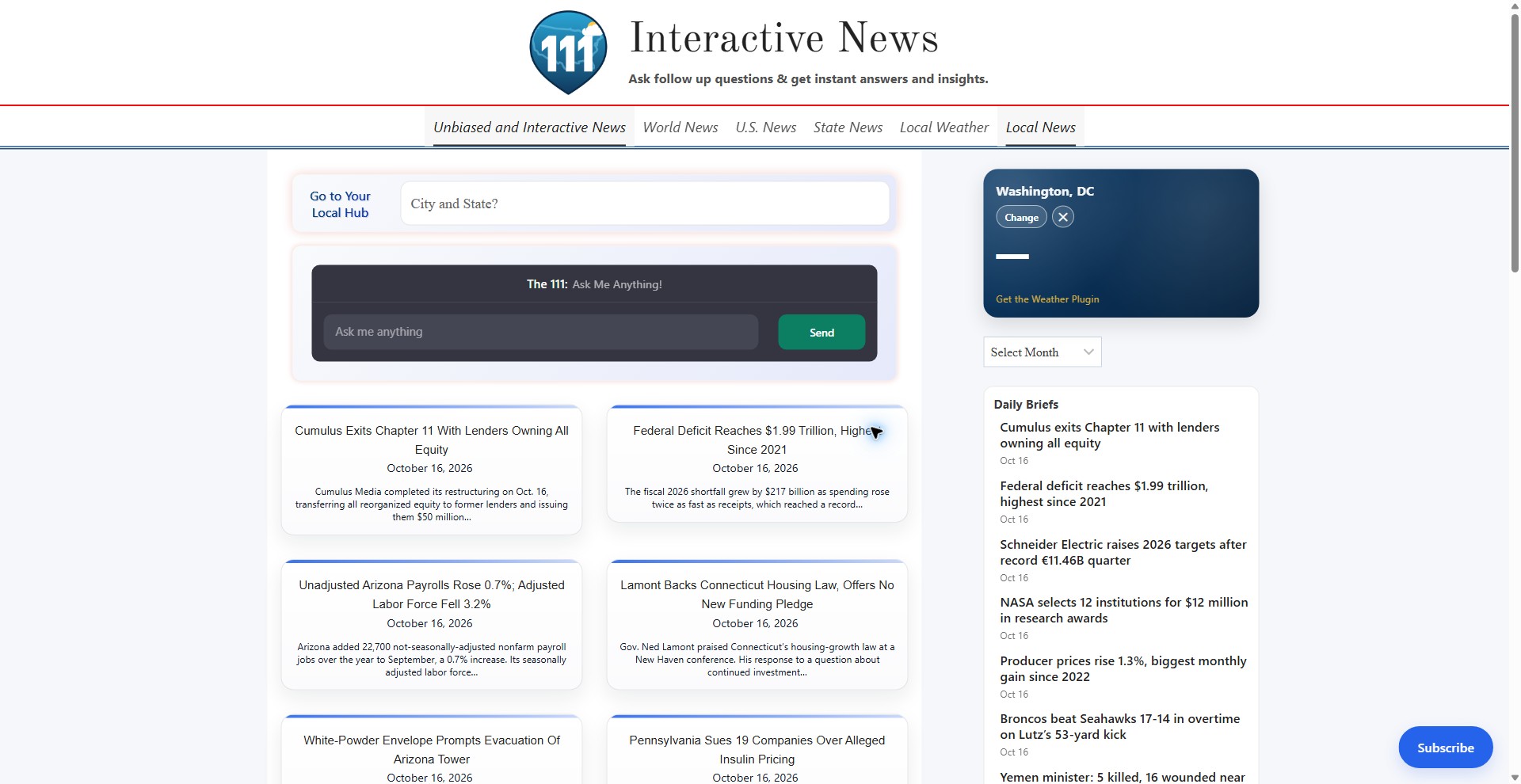
The current homepage gives readers several ways to begin: choose a city, browse headlines, ask a question or check local conditions. This October 16, 2026 refresh documents the live experience and the latest completed newsroom improvements, followed by a focused loading and mobile performance repair.
Stable headlines and faster access to local information
We replaced the delayed masonry arrangement with a stable article grid, reduced unused homepage scripts, improved initial typography and moved optional search and chat downloads to the moment readers use them. Analytics starts after the first paint so the page can appear sooner.
Design and functionality review — October 17, 2026
We restored the original assistant greeting, input, colors and controls in the first view. Opening the assistant loads its native editable interface. City discovery and the original article content remain available.
Local discovery that works on a phone
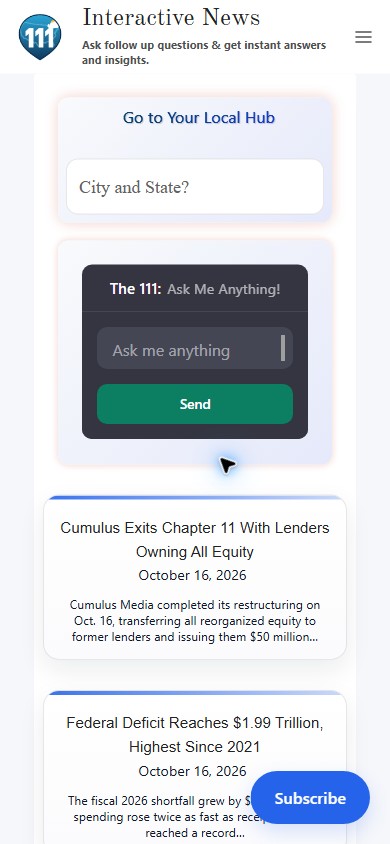
The mobile view keeps the main entry points together: city search, a question prompt and a readable stream of news cards. The desktop columns become a single column, and the navigation moves into a compact menu. The phone feed now uses normal page flow, so its headlines do not wait for the desktop column-arrangement script.
Each story card keeps its headline and short summary together, giving readers enough context to decide what to open next. The tall screenshot shows how the page actually reads at a 390-pixel phone width.
- Choose a place: the local-hub search stays near the top.
- Ask a question: the contextual AI entry point remains available before the headline stream.
- Keep reading: stacked cards and the subscription control support the next step.
DOYJO’s work joins the responsive page layout with the search, content and AI integrations that support it. Space is reserved for the initial chat panel, and the news cards appear without a delayed fade-in. The same publishing system supplies the stories shown on desktop and mobile.
Current view captured October 17, 2026 in Chrome Incognito with DevTools mobile emulation at 390 by 844 CSS pixels.
One city, a useful starting point
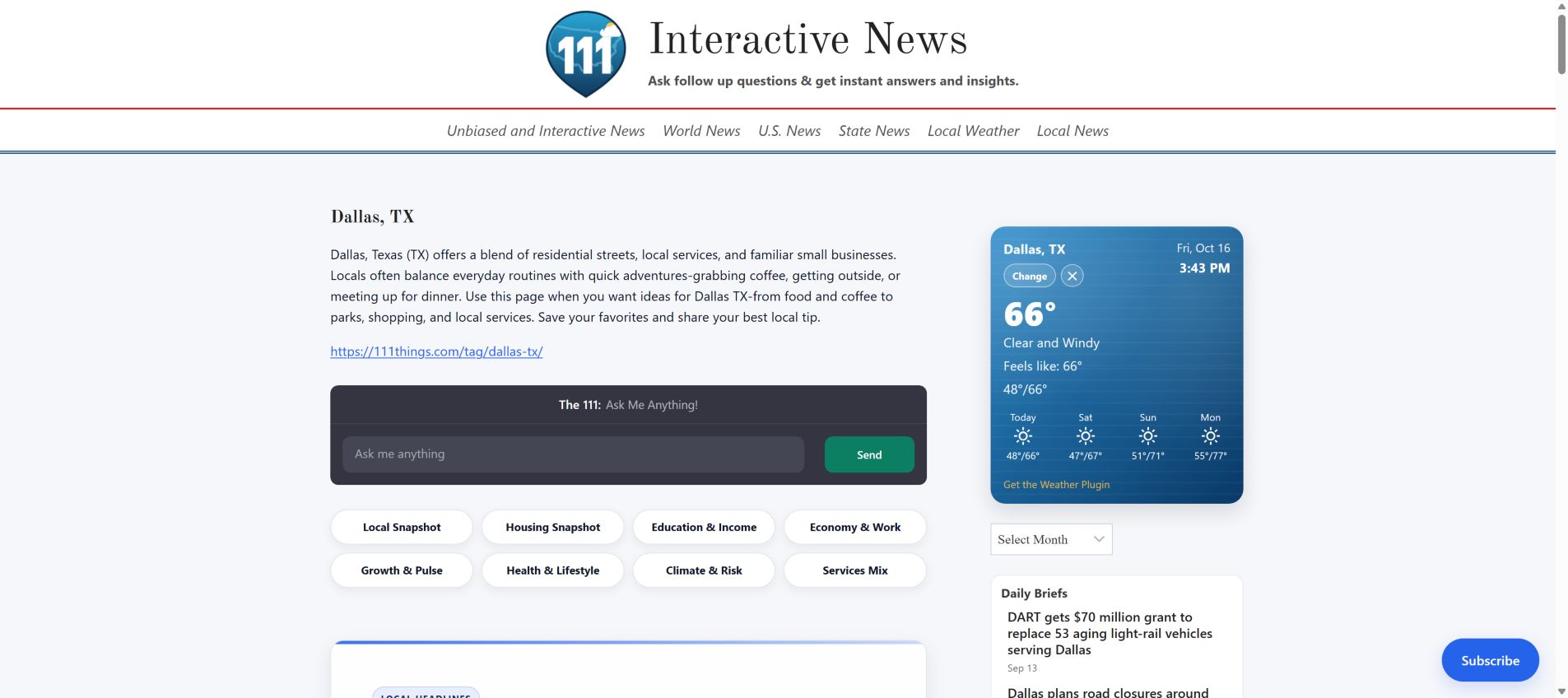
The Dallas hub brings a location introduction, suggested questions and relevant article cards into a single destination. Readers can start with their city instead of sorting through the full national feed.
DOYJO’s custom local-search and location tools connect city and state suggestions with the site’s taxonomy, contextual prompts and related headlines. The publishing workflow also carries location information forward into categorization and release.
This is the live Dallas page captured on October 16, 2026. Explore the Dallas hub.
Local utilities alongside the news
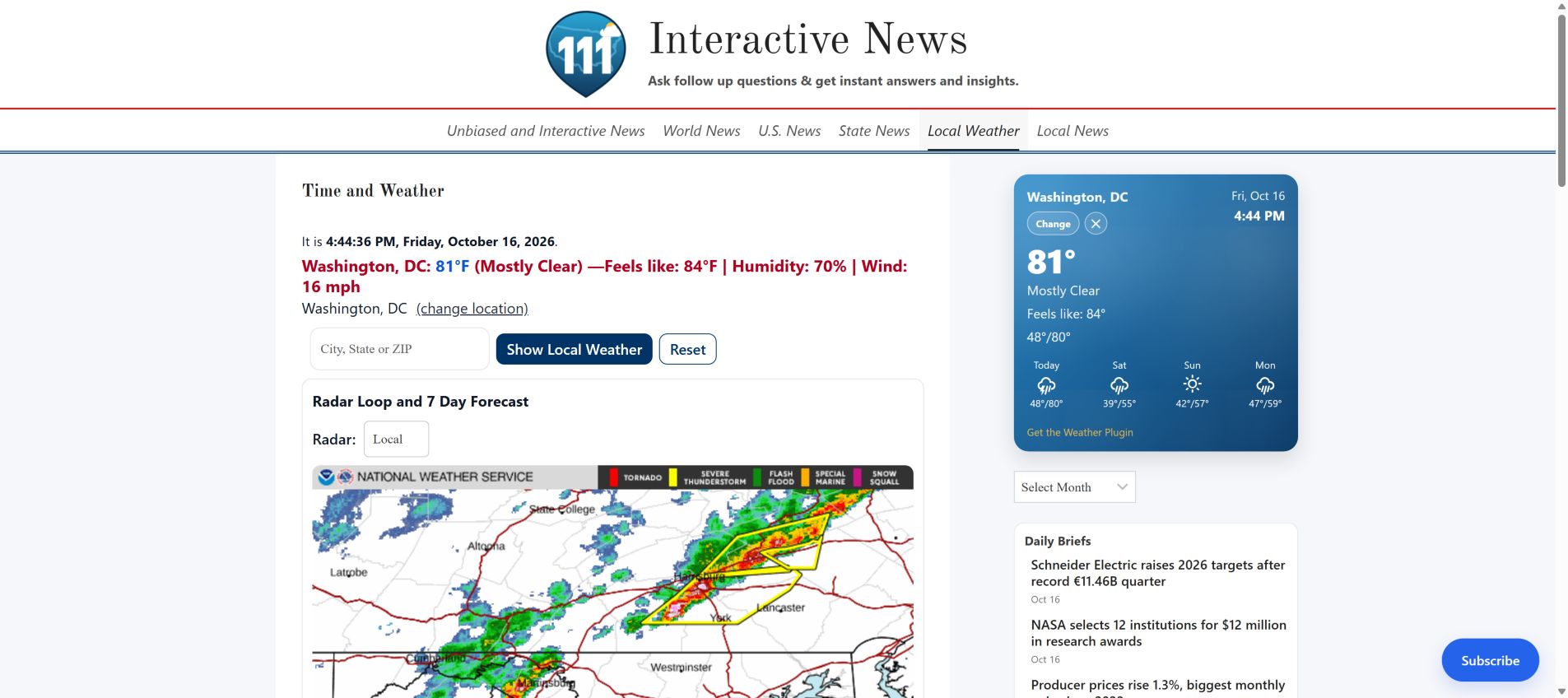
The time and weather page gives readers a practical reason to return between stories. Location controls, current conditions, radar and forecast information sit within the same publishing experience.
DOYJO connected these local-data tools with the site’s location-aware content and supporting WordPress components. The screenshot shows the live conditions and radar interface for the location displayed during capture.
Weather changes continuously; this image records the interface as it appeared on October 16, 2026. View the weather tools.
Sources and follow-up questions stay close to the story
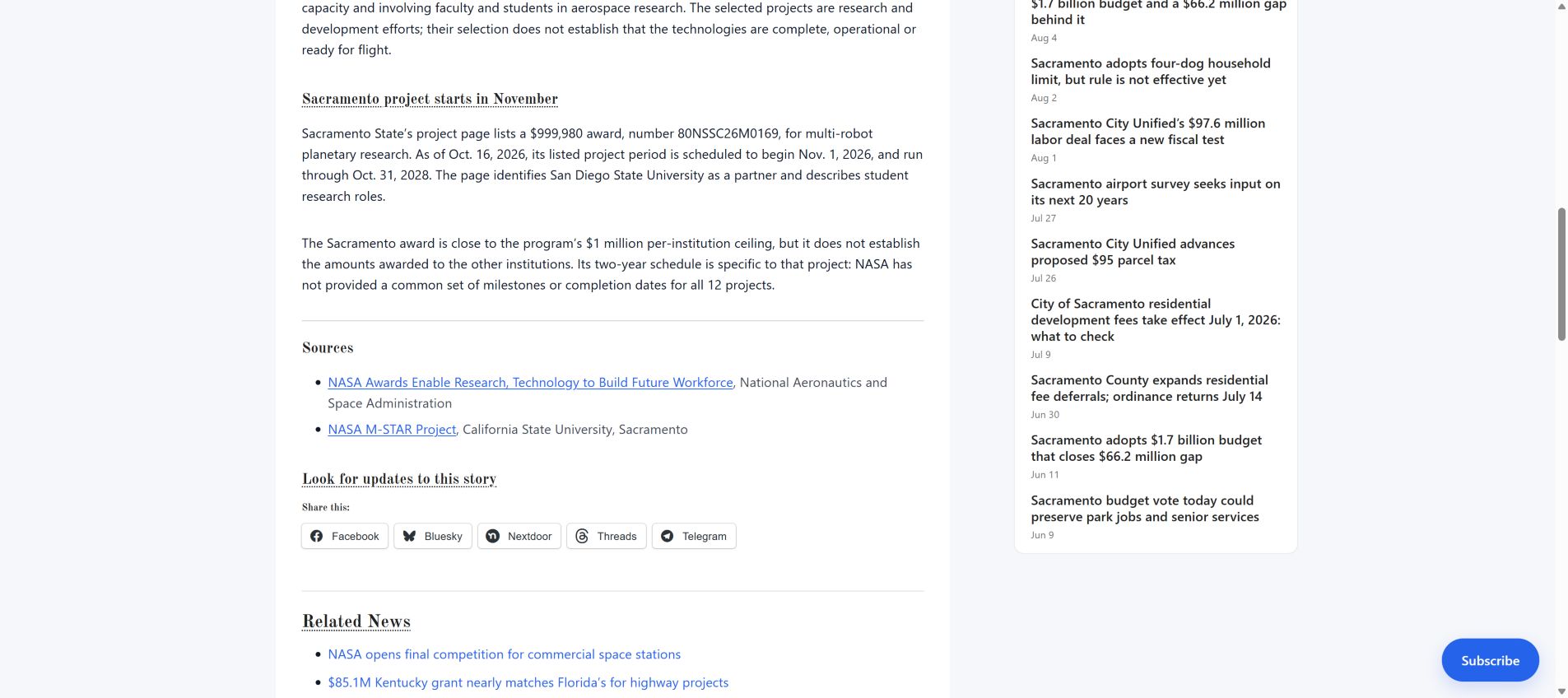
The article experience connects the reporting with its supporting material. This live NASA story includes linked NASA and university sources, a prompt to look for updates, sharing controls and related news.
DOYJO also developed contextual AI integrations for article headings and archive pages, so the surrounding topic can accompany a reader’s follow-up question. These controls sit alongside the written story and its source links.
The screenshot documents the public reading experience. The newsroom improvements described below concern the separate research, review and publication workflow behind it.
Recent newsroom improvements
October 14–15 development strengthened how the newsroom handles revision, evidence decisions and work that must wait for an available budget. The changes were checked with targeted regression tests and verified across the main site and five supporting publishing installations.
More specific rewrite feedback
When a draft fails validation, the next rewrite can receive the actual validation problem and the passage that triggered it. Readability review can distinguish a necessary factual qualification from repetition or empty boilerplate. Internal workflow language remains subject to publication checks.
Clearer evidence and editorial decisions
The workflow records a model’s recommendation separately from the decision enforced by the publication rules. A material evidence gap must remain a hold. A narrowly defined copy correction can reuse retained, fresh evidence while still passing claim validation and a separate publication-editor review.
Budget-aware continuation
When a spending limit is reached, eligible queued or running batch work can be deferred while its progress and existing editorial holds are preserved. Completed, cancelled and failed work retain their appropriate states. The repair also covers interrupted requests and uncertain completion, where a retry needs to respect work already performed.
These updates extend the existing source-packet research, duplicate prevention, editorial lanes and timezone-aware release process. Ongoing sample review and operational monitoring remain part of the work.
Custom WordPress tools behind the experience
The supporting plugin suite includes local search development, contextual daily briefs, topic quick links, location helpers and related-content controls. These components give each page a useful topic or location context.
AI chatbot context integration connects headings and archive views with the conversation interface. Resumable knowledge-sync tools support controlled updates to missing or changed content. Separate research and release roles let the publishing architecture expand across supporting installations while retaining local categories, schedules and editorial control.
Operational work also includes SMTP delivery diagnostics, retry and failover support, social-sharing image fallbacks, publisher identity, request-abuse controls, managed hosting and backups. These tools support the public experience without placing administrative controls in the reader’s path.
Fixing an unfinished load and a slow first screen
The October 16 performance investigation traced the incomplete-loading warning to a visitor-verification request whose response was not being fully consumed. DOYJO repaired that request handling during the investigation. Request Guard was subsequently disabled pending further correction and retesting. The current mobile and desktop audits completed without loading warnings.
The homepage delivery was then improved by serving theme fonts locally, removing forced font preloads that delayed the first screen, delivering the local homepage styles without blocking stylesheet requests, and deferring eligible scripts through WordPress dependency handling.
The phone news feed now uses a regular single-column layout, the initial chat area has reserved space, and the story cards appear immediately. Desktop columns, local search, weather, navigation and the chat controls remain available. These changes address loading and visual stability while preserving the newsroom features shown above.
The current reports below used Lighthouse 13.5.0 in fresh Incognito sessions with extensions disabled. Request Guard remains disabled. Following the additional loading and third-party script improvements, both recorded runs score 100 for Accessibility, Best Practices and SEO.
These dated lab measurements describe the tested homepage. They do not guarantee every visitor’s experience, complete accessibility, search rankings or business results.
Measured results after the preservation review
The current website views and reports document the design and functionality review completed October 17, 2026. Original imagery, intended layout and important visitor controls are checked alongside loading performance.
Lighthouse 13.5.0 ran in fresh Chrome Incognito sessions with extensions disabled. Each screenshot below matches its stated audit and timestamp. These lab measurements can vary and do not establish search rankings, revenue, real-user performance or complete accessibility.
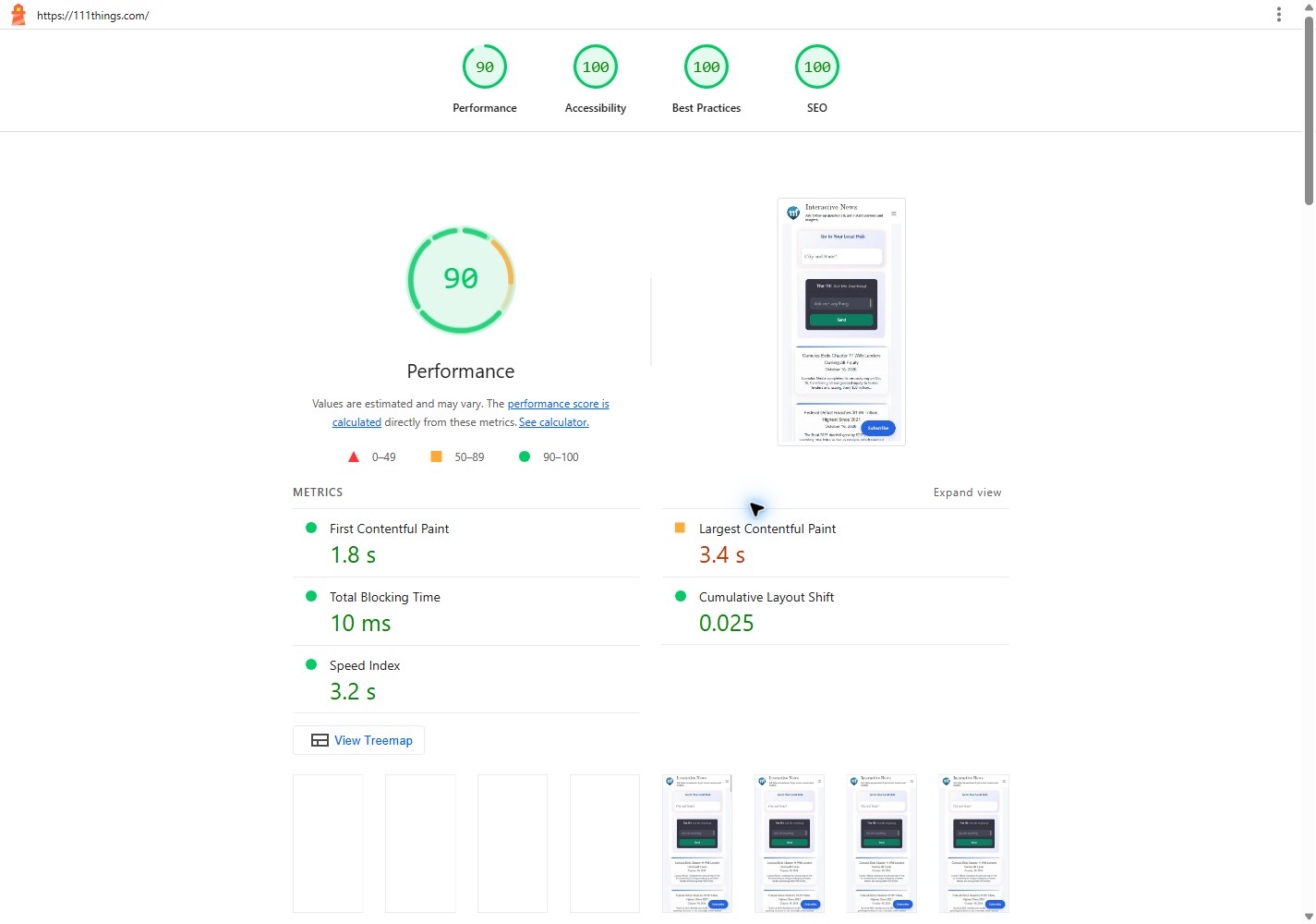
Mobile Lighthouse results
October 17, 2026 · current preservation review
- Performance
- 90
- Accessibility
- 100
- Best Practices
- 100
- SEO
- 100
Completed without a Lighthouse run warning.
First contentful paint: 1.8 s. Largest contentful paint: 3.4 s. Blocking time: 10 ms. Layout shift: 0.025.
Moto G Power emulation with simulated Slow 4G and CPU slowdown. Audit timestamp: 2026-10-17T05:24:39.872Z. Review date: October 17, 2026, America/Chicago.
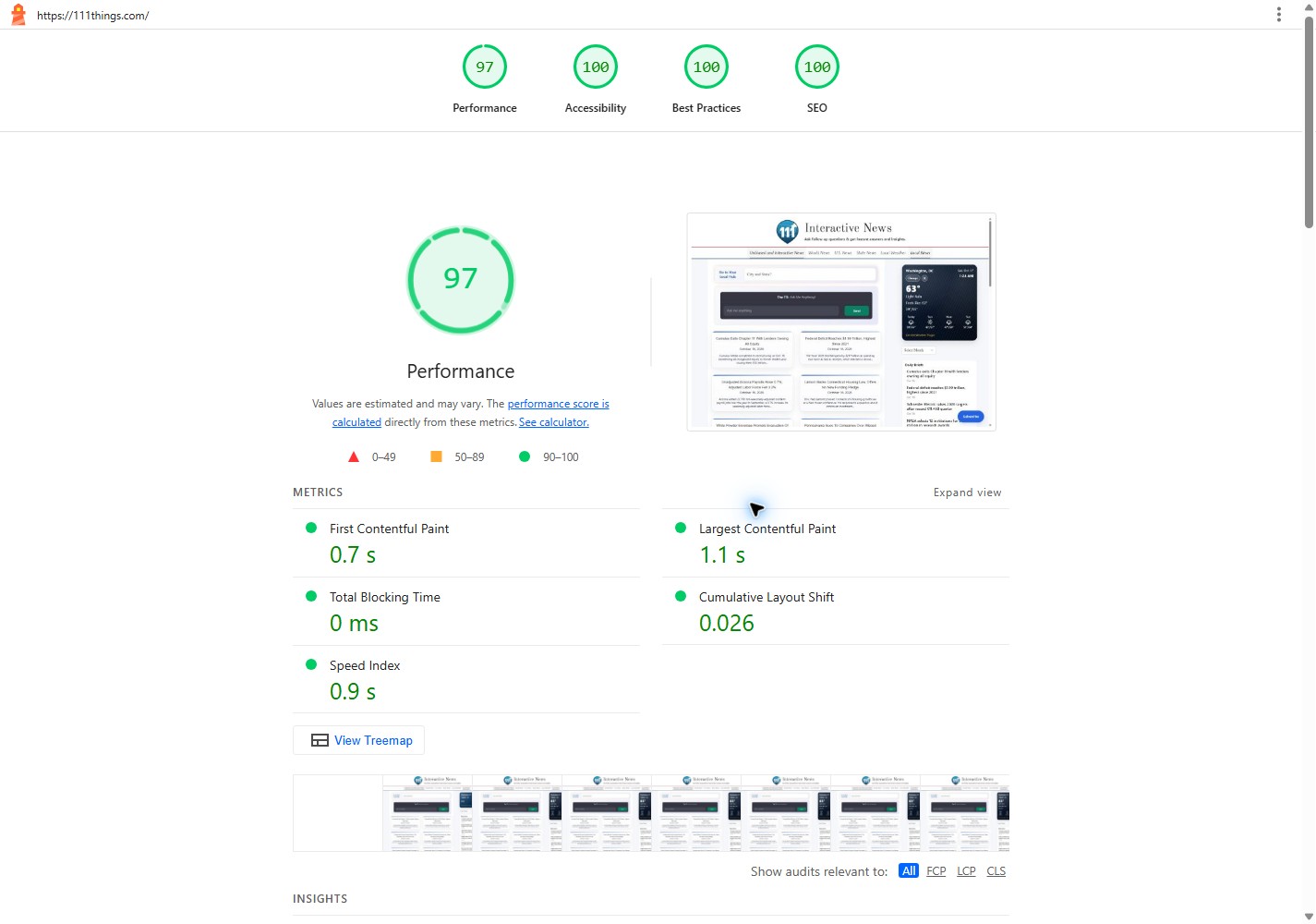
Desktop Lighthouse results
October 17, 2026 · current preservation review
- Performance
- 97
- Accessibility
- 100
- Best Practices
- 100
- SEO
- 100
Completed without a Lighthouse run warning.
First contentful paint: 0.7 s. Largest contentful paint: 1.1 s. Blocking time: 0 ms. Layout shift: 0.026.
Desktop preset with simulated network conditions. Audit timestamp: 2026-10-17T05:24:52.842Z. Review date: October 17, 2026, America/Chicago.
Google Search achievement history
Successive milestones, documented by Google
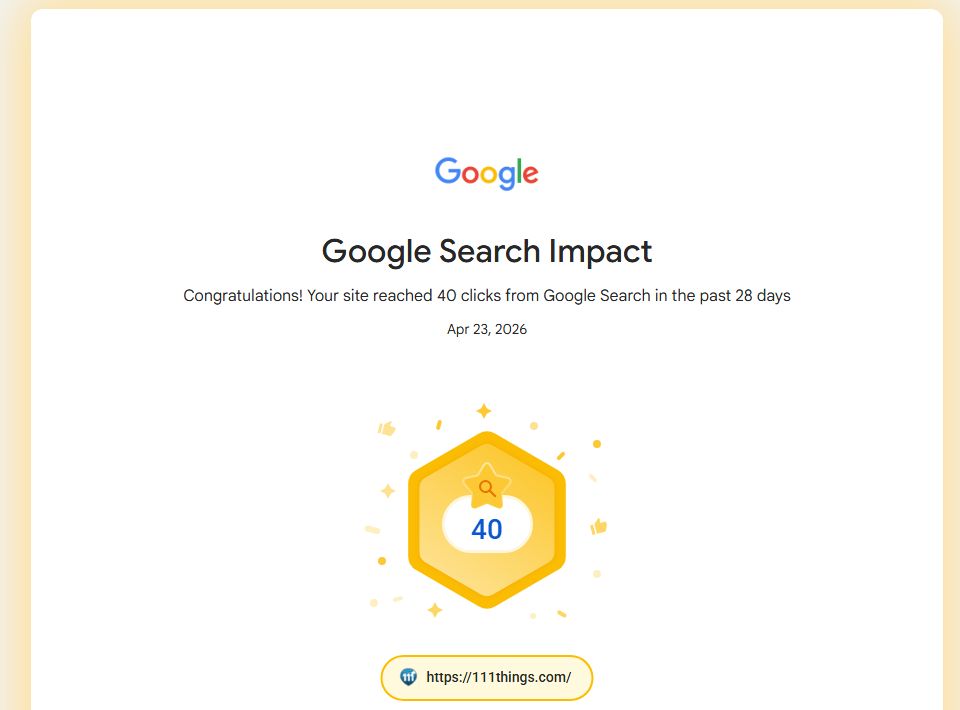
Google’s saved achievement history documents progression from the 15-click milestone on Jan 1, 2025 to the 40-click milestone on Apr 23, 2026.
| Google milestone | Achieved |
|---|---|
| 15 clicks in 28 days | Jan 1, 2025 |
| 20 clicks in 28 days | Apr 14, 2026 |
| 30 clicks in 28 days | Apr 21, 2026 |
| 40 clicks in 28 days | Apr 23, 2026 |
These dated achievements make the campaign’s progress visible beyond a single month’s comparison. We preserve the proof and continue using current search data to choose the next practical improvement.
Each badge represents a historical 28-day milestone. The milestones are not added together or presented as current monthly traffic, and the earliest saved badge is not assumed to be the campaign start.
Your next step
Let’s talk about your project.
Interested in an approach like this? Tell Brian about your business, the part of this example that interests you and what you want to improve.